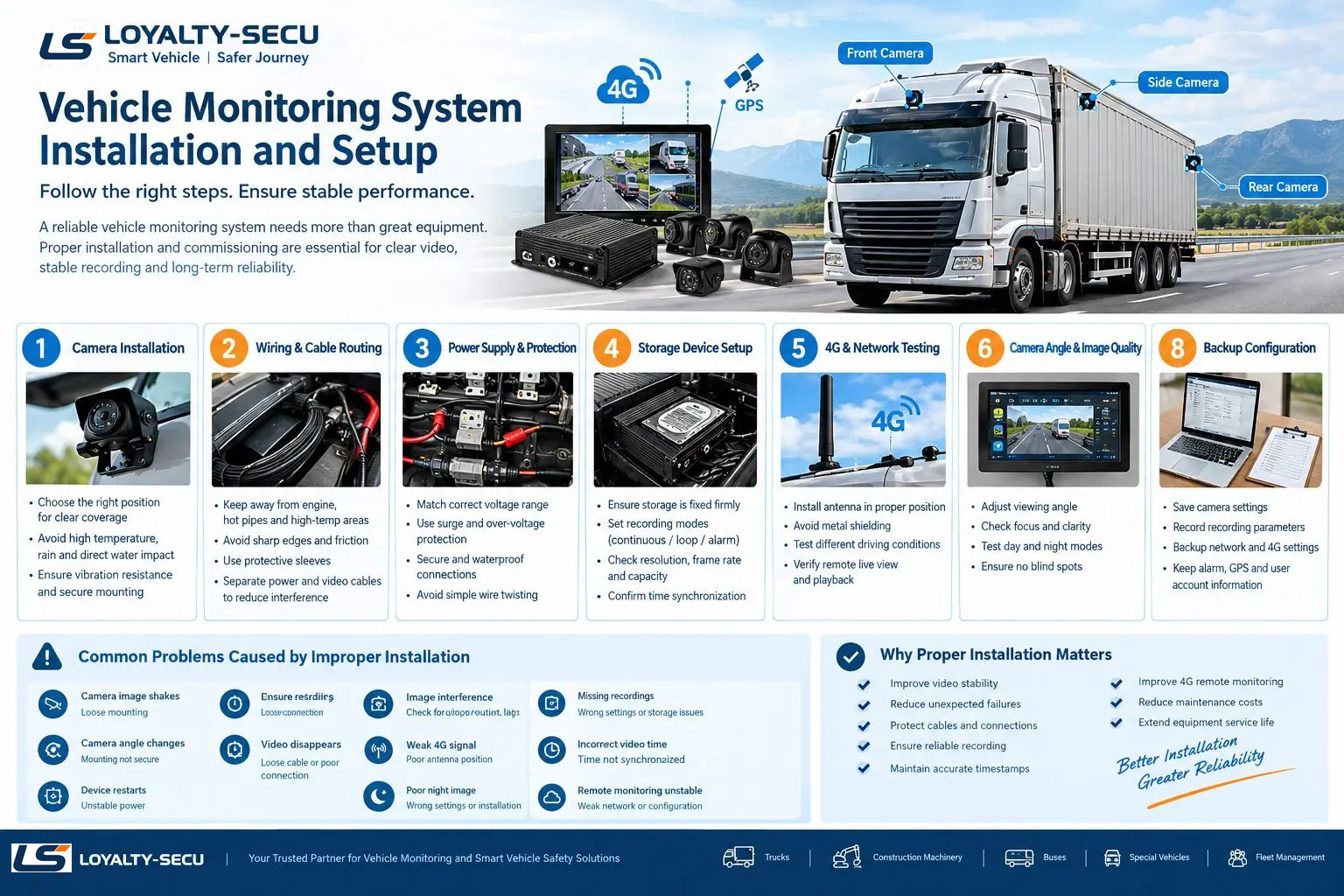
A vehicle monitoring system needs to deliver clear video, reliable recording, and stable operation under constantly changing driving conditions. Unlike indoor CCTV systems, vehicle surveillance equipment must withstand vibration, temperature changes, electrical interference, dust, moisture, and voltage fluctuations.
For this reason, proper installation and commissioning are just as important as choosing the right vehicle camera and recording equipment. Many common problems—such as video interruptions, missing recordings, camera movement, unexpected device restarts, and unstable 4G connections—can be traced back to installation or setup issues.
Whether the system is installed on a truck, excavator, loader, bus, emergency vehicle, or other special vehicle, the following points should be carefully checked.
1.Choose the Right Camera Installation Position
Camera positioning directly affects the monitoring coverage and image quality of a vehicle surveillance system.
When installing vehicle cameras, consider both the required viewing area and the operating environment. Cameras should be positioned to avoid direct exposure to extreme heat, unnecessary water impact, or other conditions that could affect long-term reliability.
For outdoor cameras, make sure the mounting position is secure and suitable for the vehicle’s operating environment. Vibration-resistant installation is particularly important because continuous movement can gradually loosen mounting screws or change the camera angle.
A poorly secured camera may result in:
- Camera angle shifting
- Shaky or unstable video
- Reduced blind-spot coverage
- Loose mounting hardware
- Incorrect monitoring areas
For construction machinery and heavy vehicles, additional attention should be paid to vibration and mechanical impact because the working environment can be significantly harsher than normal road transportation.
2.Plan the Wiring Carefully
Cable routing is another critical part of vehicle camera installation.
Whenever possible, wiring should be kept away from high-temperature components such as engines, exhaust systems, and hot pipes. Cables should also be protected from sharp metal edges and areas where they may be repeatedly rubbed or squeezed during vehicle operation.
Long-term cable damage can eventually lead to:
- Short circuits
- Intermittent video loss
- Power interruptions
- Camera disconnection
- Communication failures
For heavy-duty vehicles and construction equipment, protective sleeves or other appropriate cable protection methods can provide additional mechanical protection.
3.Pay Attention to Power Supply and Electrical Protection
Vehicle electrical systems are different from standard fixed installations. Voltage fluctuations, engine starting, electrical loads, and other factors can affect surveillance equipment.
Before connecting the system, confirm that the vehicle monitoring equipment matches the required input voltage range.
The power connection should also be properly secured and protected. Avoid simply twisting wires together. Connections should be properly insulated and, where necessary, protected against moisture and vibration.
For reliable operation, installers should also consider appropriate surge and voltage protection according to the vehicle and equipment specifications.
Another important point is cable routing. Power cables and video signal cables should be routed appropriately to reduce potential electromagnetic interference from vehicle electrical systems.
Poor cable routing may cause image interference, unstable signals, or other unexpected problems.
4.Secure the Storage Device and Check Recording Settings
For vehicle surveillance systems equipped with an HDD, SSD, or memory card, storage installation and configuration should be checked carefully.
Vehicles experience continuous vibration and shock while driving. Therefore, storage devices and their connections must be securely installed to minimize the risk of contact problems.
During commissioning, verify the following recording parameters:
- Continuous recording
- Loop recording
- Alarm or event recording
- Recording resolution
- Frame rate
- Storage capacity
- Overwrite settings
- Recording schedule
After configuration, do not simply assume that the system is recording correctly.
Perform an actual playback test and confirm that the recorded video can be retrieved normally.
The system time should also be checked. Accurate date and time settings are important for video evidence and incident investigation. Incorrect timestamps can make it difficult to locate the required footage later.
5.Test 4G and Remote Monitoring Functions
For a 4G vehicle monitoring system, network configuration is another important commissioning step.
The antenna should be installed in an appropriate location with minimal obstruction.Avoid unnecessary metal shielding that could weaken the wireless signal.Do not only test the system while the vehicle is stationary. A reliable test should include different operating conditions, such as:
- Vehicle parked
- Engine running
- Vehicle moving
- Different locations or coverage areas
- Remote live viewing
- Remote video playback
This helps verify whether the 4G connection remains stable during actual vehicle operation.
For fleet management applications, stable connectivity is particularly important because operators may need remote access to live video, GPS positioning, recorded footage, or alarm information.
6.Check Camera Angle, Focus, and Night Vision
After physically installing the cameras, carefully adjust each camera’s viewing angle.
The image should cover the intended monitoring area without unnecessary blind spots.
For vehicle applications, check:
- Front and rear coverage
- Side blind spots
- Driver or cabin areas when required
- Loading or cargo areas
- Construction machinery working areas
- License plate visibility where applicable
For cameras with adjustable lenses, focus should also be checked after installation.
Night-time performance should not be overlooked. Test the camera under both daytime and low-light conditions and verify that infrared or other night-vision functions provide sufficient image quality.
A camera that looks excellent during daytime testing may perform very differently at night.
7.Perform a Full Vehicle Simulation Test
After installation and configuration, the system should not be handed over immediately.
A complete vehicle surveillance system commissioning test should simulate actual operating conditions as much as possible.
For example:
1.Start the vehicle.
2.Check the system during engine startup.
3.Test the system while idling.
4.Drive the vehicle under normal operating conditions.
5.Monitor camera images continuously.
6.Check for video freezing or frame loss.
7.Confirm that the device does not restart unexpectedly.
8.Verify continuous and event recording.
9.Test remote monitoring and communication functions.
10.Review recorded footage after the test.
This process can help identify problems that may not appear when the vehicle is stationary.
- Back Up Configuration Parameters
Before completing the installation, it is good practice to record and back up the main system parameters.
Depending on the equipment, this may include:
- Camera configuration
- Recording settings
- Network settings
- 4G parameters
- Alarm settings
- GPS settings
- Device addresses
- User accounts and access settings
Keeping a record of the original configuration makes future maintenance and troubleshooting much easier.
If multiple vehicles use the same monitoring solution, standardized configuration records can also help simplify fleet deployment.
Common Problems Caused by Improper Installation
Many vehicle monitoring problems do not necessarily indicate a hardware failure. They may be caused by installation or configuration issues.
| Problem | Possible Cause |
|---|---|
| Camera image shakes | Loose mounting or insufficient vibration protection |
| Camera angle changes | Mounting hardware not properly secured |
| Device randomly restarts | Unstable power connection or voltage fluctuation |
| Video occasionally disappears | Loose cable or poor connection |
| Image interference | Improper cable routing or electromagnetic interference |
| Missing recordings | Incorrect recording settings or storage problems |
| Incorrect video time | Device time not synchronized |
| Weak 4G signal | Poor antenna position or signal obstruction |
| Poor night image | Incorrect installation or night-vision settings |
| Remote monitoring is unstable | Weak network coverage or incorrect configuration |
Identifying these issues during commissioning is much easier and less costly than troubleshooting them after the vehicle has already been deployed.
Why Proper Installation Matters for Vehicle Surveillance
A reliable vehicle monitoring system is not simply a combination of cameras, a mobile DVR, storage, and a communication module.
The overall system performance depends on how these components work together under real operating conditions.
Proper installation and commissioning can help:
- Improve video stability
- Reduce unexpected equipment failures
- Protect cables and connections
- Improve recording reliability
- Maintain accurate video timestamps
- Improve 4G remote monitoring performance
- Reduce maintenance requirements
- Extend the service life of the system
This is particularly important for fleet management, construction machinery, special vehicles, emergency vehicles, trucks, buses, and other mobile surveillance applications.
Conclusion
Vehicle monitoring systems operate in a much more demanding environment than fixed indoor security systems. Continuous vibration, voltage fluctuations, temperature changes, electromagnetic interference, and changing network conditions all need to be considered during installation and commissioning.
From camera positioning and cable routing to power protection, storage configuration, 4G connectivity, night-vision testing, and full vehicle simulation, every step can affect the long-term reliability of the system.
A well-designed installation and thorough commissioning process can significantly reduce common failures and help ensure stable, reliable vehicle surveillance in real-world operating conditions.
LOYALTY-SECU provides vehicle monitoring and smart vehicle safety solutions for trucks, construction machinery, special vehicles, and fleet applications, including multi-camera monitoring, 4G communication, GPS positioning, video recording, blind-spot detection, and AI-based safety functions.